
Salon & appointment POSBranch Services
A salon does not sell transactions. It sells a day, a set of chairs booked from open to close. Branch Services runs on that day: a column for every stylist, one ticket at the chair, and what each of them earned worked out line by line.
- Day-at-a-time board
- Per-stylist commission
- Text and email reminders
- Gift cards and points
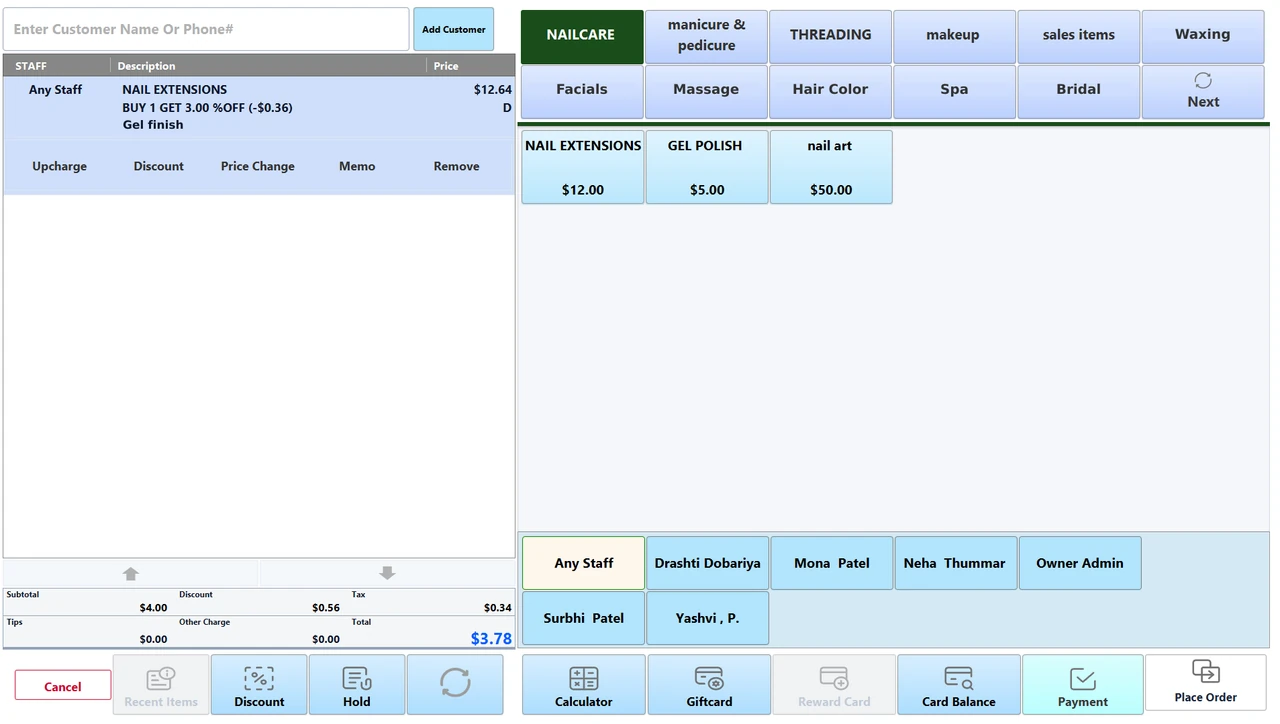
The day, a column at a time.
A column for every stylist, from your opening time to your closing time, in slots of ten, fifteen or thirty minutes. It is a day board rather than a calendar: you jump to the day you want and see the whole of it.
- 01
Open the day
One day at a time, from when you open to when you close, with a column for every stylist you put on it.
- 02
Book it
Drop it into a ten, fifteen or thirty-minute slot. The service brings its own duration, and a stylist who takes longer than that carries their own.
- 03
Start the service
Mark the client shown, a no-show or canceled, start the service when they sit down, and complete the appointment once the ticket is paid.
- 04
The day as booked
A booking with nobody on it yet waits in the Any Staff column until you drag it across to whoever takes it.
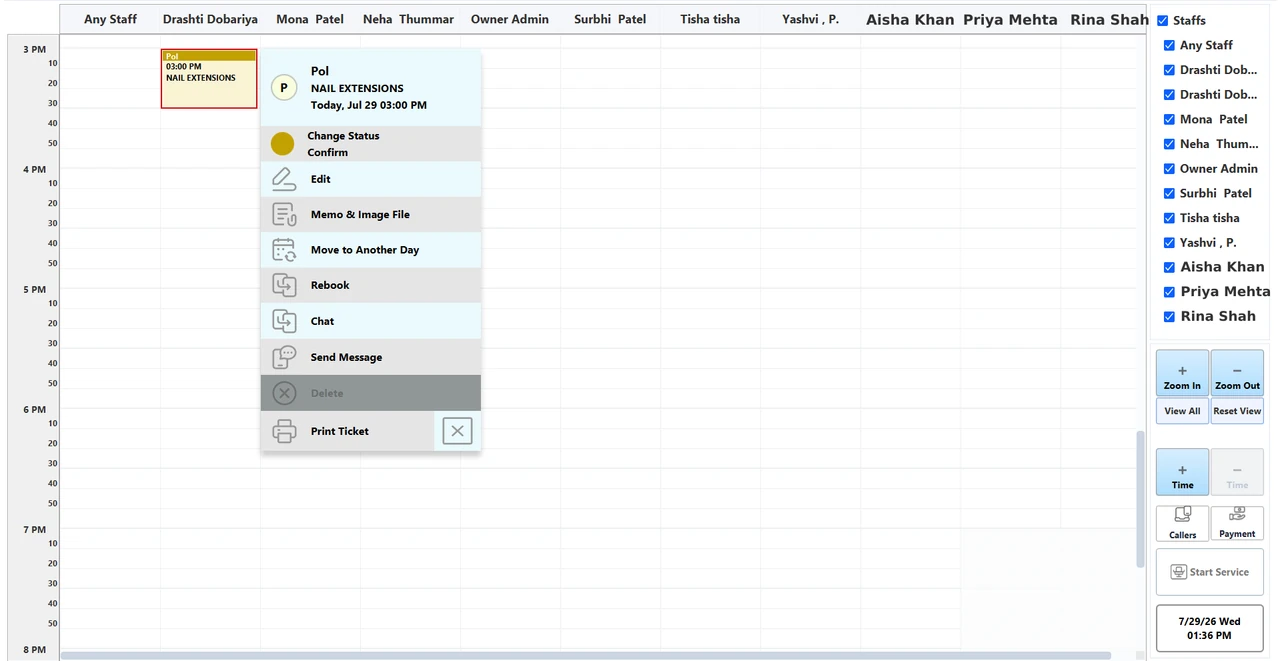
One ticket, however many people touch it.
Every line on the ticket carries the stylist who performed it, which is what the takings are split by later, and it all settles in one payment however many services and products are on it.
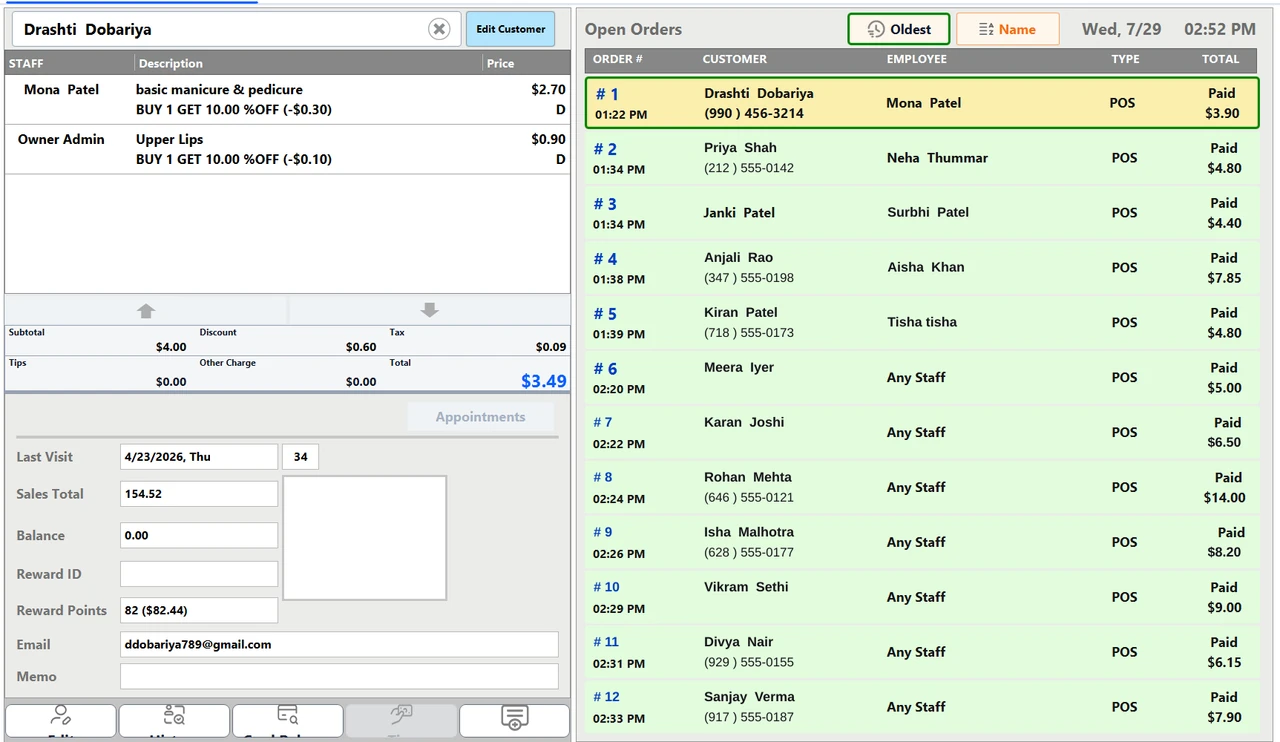
A stylist on every lineEach line records who did the work, so one visit can be shared by three stylists and split three ways.
Discounts come off the lineA discount is taken off the line it belongs to, before commission is worked out on it.
Upcharges that earn tooAdd a length, a color or a treatment to a line and its price joins the line, so the stylist earns commission on it at the same rate as the service itself.
A memo and a photoAttach free text and a picture, taken on the spot or picked off the machine, to the visit itself.
Products on the same ticketRing retail-style items beside the services and settle the lot in one payment. Flag a category as Sales Items and the receipt prints a quantity where the stylist’s name would go.
Walk-ins and guestsA walk-in is just a ticket rung with no slot, and an appointment booked without a client record rings as Guest.
Commission, worked out line by line.
Set a rate per stylist per service, and Branch works it out on each line for the person who did the work, so a ticket with three stylists on it pays three people.
Because the service’s own cost comes out first, a percentage is a share of what the line makes rather than of what it sold for. There is no house default: a stylist earns on the services you switch on for them, and on service lines only.
- The line : Price times quantity, before tax.
- Less the discount : Whatever came off that line comes off first.
- Less the service’s cost : The cost you put on the service comes out too.
- Times the rate : The percentage you set for that stylist on that service.
The part that fills next week.
A day board only stays full if the client returns, so the reminder, the rebook and whatever they are owed all sit on the same record as the chair.
Reminders that go out on their ownBy email, text or both (the moment the appointment is booked at the counter, or a set number of days before it) from a message you write yourself, with merge fields for the client, service, date, time and store. Text messages go to US numbers.
Rebook before they leavePull up what the client had last time and start the next appointment from it, while they are still at the counter.
Gift cardsSell and reload store gift cards, check what is left on one, and print a balance receipt or the card’s history.
Store creditHold a credit balance on the client’s record and tender it at the counter, up to whatever is left on it.
House accountsClients you mark as account customers can charge to a house account, with a customer center, receive-payment and balance screens in the back office.
Reward pointsPoints with your own earning rules and redemption rates, redeemed at the payment screen once the client is on the ticket. It is their record that carries the balance, not a card to swipe.
Online bookings land on the boardRequests from your booking app arrive straight on the schedule board: confirm each one yourself or let them confirm automatically, choose which payment methods clients may use, and write the messages they get back. Your dealer sets the booking app up, and the store has to be online for it.
The parts that do not change.
However the day goes, it rings on the same terminal, settles the same way, and is put in by the same people who answer the phone afterwards.
When the line drops
The terminal keeps a local copy of your staff, services, pricing and settings, so signing in and permissions keep working and it re-syncs the moment the line returns. Selling and the board wait for the line.
Dual pricing
Cash and card totals side by side on the customer display, with the card fee set as a percentage per item, printed as both prices on every line, or as cash prices with the fee on its own.
Tips
Take a tip at the counter or on the customer-facing display with your own suggested percentages, and add or change one on a card transaction after the sale. A tip is recorded on the ticket, not against the stylist on the line.
Install and support
US-based installation, staff training and ongoing service. We set the hardware up on site, not by shipping you a box.
The back office is the terminal.
Reports, stock, payroll and permissions all run on the POS itself. The web dashboard ships with Branch Eats today, with Services coming.
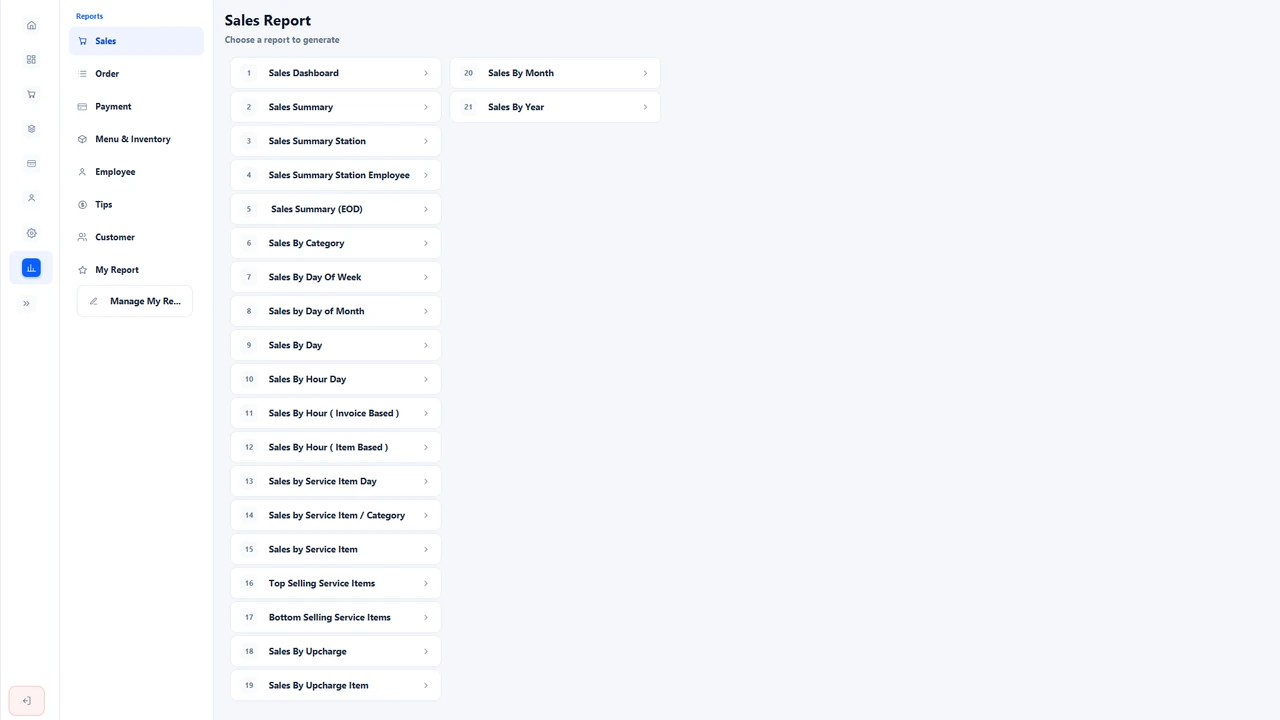
The report menu on the terminal: eight categories and more than eighty reports, each printed or emailed as a PDF on the schedule you set. 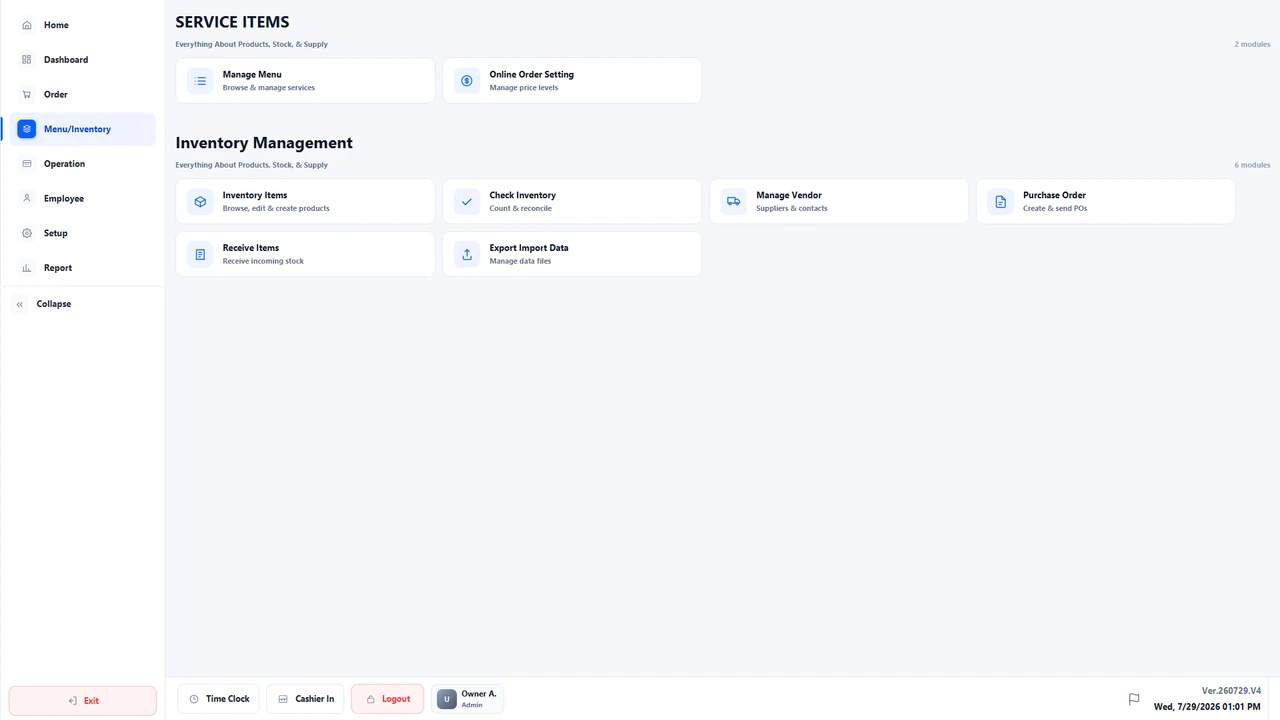
Service items and the stock you buy in: manage the menu, then move stock by purchase order, receiving and counts. A record of what you hold, not a catalogue the ticket sells from.
Eight report categoriesSales, Order, Payment, Menu & Inventory, Employee, Tips, Customer and a My Report shelf of the ones you keep, more than eighty reports in all, each printed or emailed as a PDF on a schedule you set, daily, on chosen weekdays, or on the first or last day of the month.
Purchase orders, receiving and countsA back-office stock ledger for the products you buy in, moved by purchase orders, receiving and physical counts. It is a record of what you hold, not a catalog the ticket sells from.
Payroll from the punchesHours and gross pay worked out from the clock (daily, weekly, bi-weekly or monthly, with paid or unpaid breaks), ready to review and print as a pay slip.
Time clock at the terminalStaff clock in, out and on break at the terminal, with an optional password and a manager approval when a punch falls outside the hours they are down for.
Seventy-five permissionsSeventy-five individual staff permissions in seven groups, set per action rather than per screen, each with a manager override for the times someone has to get past one.
See Branch Services in your salon.
We set the hardware up on site, load your services, stylists and hours and train the people who will use it. Installation and support run out of New York.
Book a walkthrough